
Getting Started#
Things to know about OpenAlea.RATP …#
Based on a single Fortran90 program, the OpenAlea version of RATP is still implemented in Fortran90 with some specificities:
The RATP code is now divided into several Fortran90 modules which can be used as a Python library in the ALEA environment. A Fortran90 module includes public variables and subroutines, which are all accessible in the OpenAlea environment.
Input variables and files are managed in Python through dedicated python nodes available in the VisuAlea environment.
The RATP core i.e. radiation balance, heat energy balance and leaf physiological models (transpiration and photosynthesis) are still Fortran90 modules and are not available for users.
First tutorial#
Load OpenAlea.RATP#
Launch the Tuto1 composite node from the openalea.ratp package (openalea.ratp.demo.RATPTuto1):
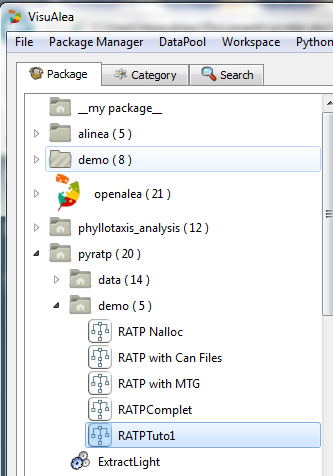
The following workspace should open :
This workspace is composed of:
Five input files (first line): from left to right: the 3D plant file, the grid configuration file, the vegetation file, the sky discretization file and the meteo data file.
Five nodes to read input files (second line)
One specific node to fill the grid with the 3D leaves (fillgrid)
The RATP core composed of the DoAll() method (irradiation balance and heat balance) and the DoIrradiation() method (irradiation balance)
Description of input files#
Many input parameters are necessary to run RATP. It is out of the scope of this short tutorial to describe all this parameters. All information about these input files can be found in /LINK TO PDF ou WORD FILE/
Run OpenAlea.RATP#
To run OpenAlea.RATP click right on the node “DoAll” and run the node. All the input files will be read sequentially. The success of each step and the computational time should be highlighted in the console window as follow:
VEGE3D OK
GRILLE OK
GRILLE OK
VEGETATION OK
SKYVAULT OK
MICROMETEO OK
Evaluation time: 3.07400012016
OpenAlea.RATP outputs#
At the end of the computation, four output files are stored in the directory: C:\tmpRATP\Resul\: data.txt, spatial.txt, tree.txt and VoxelsGrid.vgx .
Description of output files#
The data.txt file: an ASCII file which lists the values of all input parameters.
The spatial.txt file: an ASCII file containing all variables for each voxel and each time step. Each variable is store column by column.
The tree.txt file: an ASCII file storing the time evolution of some variables computed at the tree scale: tree photosynthesis, tree transpiration for instance.
The VoxelsGrid.vgx file: a vegeSTAR file that enables to visualize the 3D grid with the VegeSTAR software (http://www6.clermont.inra.fr/piaf/Telechargements) or with PlantGL
Visualize output as 3D data#
The OpenAlea.RATP outputs can be visualized at the leaf scale or at the voxel scale.
3D Voxel scale
To visualize the voxels you first have to extract from the entire spatial output data the variable to plot for a specific time step. Then write this data in a file according to the vtk format (to be use with the Paraview software) using the RATP2VOXELS python node. The following data flow shows how to connect all the nodes and to define the day, the hour and the RATP variable to extract.
3D leaf scale
To visualize the OpenAlea.RATP outputs as 3D data you can either use plantGL method or python nodes dedicated to OpenAlea.RATP In both case 3D plot are colored according to one variable output variable i.e. one which is stored in the spatial.txt file.